Choosing the PSU: Why Efficiency at Low Load Matters More Than Peak Wattage
An SFF homelab needs an SFX power supply — but which one? Here's why the Corsair SF750 Platinum is the right choice even for a system that idles at 30W, and why PSU efficiency curves matter more than the number on the box.
On this page
The CPU cooler is picked. The last major component decision is the power supply — the one component that touches everything in the system and can, if chosen poorly, either waste electricity 24/7 or limit what you can do later.
For a homelab in the Sagittarius case, the form factor is non-negotiable: SFX. Standard ATX power supplies physically don’t fit. That narrows the field, but within SFX there’s still a meaningful choice to make between wattage, efficiency, and noise.
Why Form Factor Matters
Quick primer on PSU sizes, because this trips up a lot of first-time SFF builders:
- ATX: 150 × 86 × 140mm (standard size). Fits 99% of desktop cases. Does not fit most SFF cases, including the Sagittarius.
- SFX: 100 × 63 × 125mm. About 40% smaller by volume. The standard for compact builds.
- SFX-L: 100 × 63 × 130mm. Five millimeters longer than SFX, which accommodates a larger (120mm) fan for quieter operation. Compatible with most SFX mounts, but check your case — some SFX cases don’t have the extra 5mm of depth.
The Sagittarius has an SFX PSU mount. SFX it is. SFX-L would also fit physically, but the selection there is smaller and typically more expensive for equivalent specs.
The Efficiency Trap
Here’s the non-obvious thing about choosing a PSU for a 24/7 server: the wattage rating is the least important number on the box.
This homelab will idle at roughly 25-35W as a system. Even under moderate load — a few VMs active, Plex transcoding, some container activity — it’ll pull maybe 60-80W. With a GPU running AI inference, peaks might hit 150-200W. And that’s it. This is not a gaming PC that regularly draws 400-600W.
What matters for a machine that spends 90%+ of its life at idle or light load is the efficiency curve — how much electrical energy the PSU wastes as heat at different load levels.
80 PLUS certification measures efficiency at 20%, 50%, and 100% load:
| Certification | 20% Load | 50% Load | 100% Load |
|---|---|---|---|
| 80 PLUS | 80% | 80% | 80% |
| 80 PLUS Bronze | 82% | 85% | 82% |
| 80 PLUS Gold | 87% | 90% | 87% |
| 80 PLUS Platinum | 90% | 92% | 89% |
But here’s the catch: these are measured at percentages of the PSU’s rated wattage. For a 750W PSU, 20% load is 150W. For a 450W PSU, 20% load is 90W. A system idling at 30W is below 20% load on any of these units — and below 20% load, efficiency drops.
This creates a counterintuitive situation: a higher-wattage PSU with better efficiency certification can actually waste less power at idle than a lower-wattage PSU with worse certification. The relationship between rated wattage, efficiency tier, and actual idle draw is not linear.
The Contenders
Corsair SF450 / SF600
| Spec | SF450 | SF600 |
|---|---|---|
| Wattage | 450W | 600W |
| Efficiency | 80 PLUS Gold | 80 PLUS Gold |
| Form Factor | SFX (100 × 63 × 125mm) | SFX (100 × 63 × 125mm) |
| Fan | 92mm | 92mm |
| Zero RPM Mode | Yes | Yes |
| Modular | Fully | Fully |
| Warranty | 7 years | 7 years |
| Used Price | ~€50-65 | ~€60-75 |
The lower-wattage options. Both are solid, well-reviewed SFX power supplies from the Corsair SF Gold line. 450W and 600W are both more than enough raw wattage for this build — even with a GPU, 450W would cover the peak draw.
Why I passed:
80 PLUS Gold isn’t bad, but Platinum is better at low load. The efficiency difference between Gold and Platinum at 20% load is roughly 87% vs 90%. That’s 3 percentage points. On a system drawing 150W at 20% load, that’s about 5W of wasted heat. At 30W idle, the gap widens because the PSU is operating even further below its optimal range.
Wattage headroom. 450W is technically sufficient, but it leaves minimal headroom for a future GPU. If I add a 150W GPU later, the system could draw 250-300W under combined load — that’s 67% of a 450W PSU, which is fine for efficiency but not great for component longevity. PSUs that regularly run at high load percentages generate more heat and stress their capacitors more. The SF600 is better here, but for €10-15 more, the SF750 offers even more breathing room.
Cooler Master V550 SFX
| Spec | Value |
|---|---|
| Wattage | 550W |
| Efficiency | 80 PLUS Gold |
| Form Factor | SFX (100 × 63 × 125mm) |
| Fan | 92mm FDB (Fluid Dynamic Bearing) |
| Zero RPM Mode | Yes |
| Modular | Fully |
| Warranty | 10 years |
| Used Price | ~€55-70 |
A strong competitor from Cooler Master. The V550 SFX is well-regarded in the SFF community — good build quality, quiet fan, and a 10-year warranty that’s three years longer than Corsair’s 7.
Why I passed: Same efficiency tier as the SF450/SF600 (80 PLUS Gold). The 10-year warranty is nice, but on the used market the warranty is typically non-transferable or partially expired. At similar pricing, the Corsair SF750 Platinum offers better efficiency for the same money.
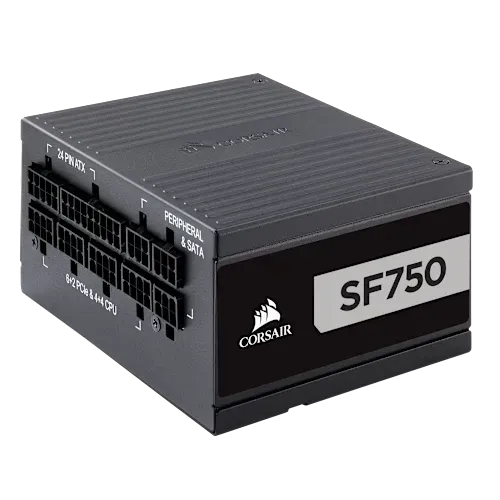
Corsair SF750 Platinum (Winner)
| Spec | Value |
|---|---|
| Wattage | 750W |
| Efficiency | 80 PLUS Platinum |
| Form Factor | SFX (100 × 63 × 125mm) |
| Fan | 92mm PWM (Rifle Bearing) |
| Zero RPM Mode | Yes |
| Modular | Fully |
| Cables | Premium individually sleeved |
| Connectors | 1× ATX, 2× EPS, 4× PCIe, 8× SATA, 3× PATA |
| Protections | OVP, UVP, SCP, OTP, OPP |
| Warranty | 7 years |
| Dimensions | 100 × 63 × 125mm |
| Weight | 2.1 kg |
| Price | ~€100-130 (used) |
Why this won:
Platinum efficiency at low load. The SF750 Platinum achieves up to 92% efficiency. At the loads this homelab will actually run:
- At idle (~30W from the wall): the PSU operates at roughly 4% load. Efficiency here isn’t great for any PSU, but the Platinum-grade components and design maintain better efficiency at light loads than Gold-rated units. The actual idle draw difference is small (1-3W), but over a year at €0.30/kWh, every watt at idle costs about €2.60. It adds up.
- At moderate load (~80W): roughly 11% load. Efficiency is climbing toward the 90% mark. A Gold-rated PSU at the same absolute wattage would be at 85-87%.
- At GPU burst (~200W): roughly 27% load. Right in the efficiency sweet spot for a Platinum PSU — 90-92%.
Zero RPM fan mode. Below a certain load threshold, the 92mm fan doesn’t spin at all. For a homelab that idles most of the time, this means the PSU contributes zero noise during normal operation. The fan only kicks in under significant load — during GPU inference or heavy transcoding. Even then, the PWM-controlled 92mm fan is quiet.
Headroom for the future. 750W is massive overkill for the current build (i5-12400 + DDR5 + NVMe + some 3.5” drives = 80-120W peak without GPU). But it means I can add any GPU I want later — even a 200-300W card — without replacing the PSU. The SF750 won’t even notice.
Build quality. Japanese 105°C capacitors, full suite of protections (OVP, UVP, SCP, OTP, OPP), and Corsair’s track record on the SF750 specifically. This particular model has been one of the most popular SFX power supplies since its release — it’s well-tested, well-documented, and known issues (if any) are well-catalogued.
Connector count. 8× SATA connectors covers all 8 hot-swap bays in the Sagittarius case (if I ever fill them all). 4× PCIe connectors support any dual-connector GPU. 2× EPS handles any motherboard’s CPU power configuration. Fully modular means I only plug in the cables I need — critical in an SFF case where every cubic centimeter of cable space counts.
Price. At ~€100-130 used, the SF750 Platinum is in the same ballpark as used SF600 Gold units (€60-75) with a €40-55 premium. For a component with a 7-year warranty, better efficiency, lower noise, and more headroom, the premium is easy to justify.
Why Not a Lower Wattage?
This is the most common question: “Why buy a 750W PSU for a system that draws 80W?”
Three reasons:
-
Efficiency at idle isn’t worse. A common myth is that oversized PSUs are inefficient at low load. This is technically true below ~10% load, but the difference between a 450W Gold and 750W Platinum at 30W idle is negligible — both are operating below their efficient range, but the Platinum’s better components partially compensate.
-
Fan noise is better. A 750W PSU running at 30W (4% load) generates almost no heat. Zero RPM mode stays engaged almost permanently. A 450W PSU at 30W (7% load) has slightly more thermal headroom, but in practice both are quiet. The bigger advantage comes under load — at 200W, the SF750 is at 27% load (fan stays off or barely spins), while the SF450 is at 44% load (fan is definitely spinning).
-
Upgrade path. If I add a 200-300W GPU in a year, I don’t need to replace the PSU. With an SF450, I’d be running at 90%+ load during GPU bursts — not dangerous with protections in place, but sub-optimal for component longevity.
The Decision
| Feature | SF450 Gold | SF600 Gold | CM V550 Gold | SF750 Platinum |
|---|---|---|---|---|
| Wattage | 450W | 600W | 550W | 750W |
| Efficiency | Gold | Gold | Gold | Platinum |
| Zero RPM | ✅ | ✅ | ✅ | ✅ |
| Modular | Full | Full | Full | Full |
| SATA Connectors | 6 | 6 | 6 | 8 |
| Used Price | ~€50-65 | ~€60-75 | ~€55-70 | ~€100-130 |
| Headroom for GPU | Tight | Adequate | Adequate | Generous |
The SF750 Platinum costs more. But for a PSU that will power this system for 5+ years, running 24/7/365, the better efficiency, lower noise, and GPU upgrade path justify the premium. A PSU is not the place to save €40 — it’s the foundation the entire system sits on, and it’s the most annoying component to replace later (because it means unplugging everything).
What’s Next
That’s it for the core component selection. Case, CPU, motherboard, RAM, cooler, PSU — the bill of materials is complete. The next phase is putting it all together and getting Proxmox installed. But first, here’s the full build cost breakdown to see where the money went.