Choosing the Motherboard: Why PCIe Layout Matters More Than You Think
How I went from wanting cheap DDR4 boards to choosing an ASUS Prime B760M-A DDR5 — and why the PCIe slot configuration was the deciding factor for a homelab that needs a GPU, 10GbE, and an HBA.
On this page
The CPU is decided — an i5-12400, LGA 1700. Now the question is: what board does it sit on? The motherboard is the least glamorous component in a build, but it quietly dictates what you can and can’t do. Number of RAM slots, SATA ports, M.2 connectors, PCIe layout, LAN speed — it all comes from the motherboard.
And one of those constraints turned out to be far more critical than I expected.
The DDR4 Trap
My initial plan was simple: go DDR4. The reasoning made sense on paper:
- DDR4 RAM is cheaper — new DDR4-3200 kits go for €30-40 for 32 GB. DDR5-4800 equivalents are €40-55. Used DDR4 is even cheaper
- The used market is flooded with DDR4 — everyone upgrading to DDR5 is dumping their DDR4 sticks. Supply is massive, prices are rock-bottom
- DDR5 doesn’t matter for a server — the latency and bandwidth gains of DDR5 are marginal for homelab workloads. No container or VM will notice the difference
All true. So I started looking at DDR4 motherboards on the used market.
And hit a surprise: DDR4 boards cost more used than DDR5 equivalents.
It’s counterintuitive, but the economics make sense. DDR4 boards are in higher demand because most people upgrading from older platforms already own DDR4 sticks and want to reuse them. Meanwhile, DDR5 boards have less demand because buyers need to purchase new RAM too. The result: a used B760M DDR4 board goes for €70-90, while a DDR5 variant of the same board goes for €55-70.
The “cheap DDR4” strategy saves €10-15 on RAM but costs €15-25 more on the motherboard. Net savings: zero to negative. And you’re locked into a dying memory standard with no upgrade path.
Once that math became clear, DDR4 vs DDR5 stopped being a debate. DDR5 it is.
What I Need From a Board
Before comparing specific models, the requirements:
- LGA 1700 / B760 chipset — matches the i5-12400, no need for Z790 overclocking features
- mATX form factor — fits the Sagittarius case, 4 RAM slots, enough PCIe slots
- 4x DDR5 DIMM slots — start with 32 GB, upgrade to 64-128 GB later
- 2x M.2 NVMe slots — one for the OS, one for fast VM/container storage
- 4+ SATA ports — for the 3.5” NAS drives in the hot-swap bays
- 2.5GbE LAN — anything less than gigabit is fine for now, but 2.5G is the baseline for modern boards
- PCIe layout that supports multiple expansion cards — this is the critical one
That last point needs explanation.
Why PCIe Layout Is Everything
A homelab that does everything — compute, NAS, AI — needs expansion cards. Not one. Multiple:
- GPU for AI inference — needs a PCIe x16 slot (or at minimum x8 electrically)
- 10GbE NIC or HBA card for NAS storage — needs at least a PCIe x4 slot
- Additional NIC, USB controller, or future card — a PCIe x1 slot covers this
Most mATX motherboards have 3-4 physical PCIe slots. But the electrical configuration varies wildly between models, and that’s where the trap is.
A board with one x16 slot and two x1 slots has three physical slots — but those x1 slots can only fit x1 cards. A 10GbE NIC (which needs x4) physically won’t fit in an x1 slot (the connector is too short), or if you file down the slot end, it’ll run at x1 speed — 1 GB/s instead of 4 GB/s, making 10GbE pointless.
This is the spec that eliminated half the boards I looked at.
The Contenders
Gigabyte B760M DS3H DDR4
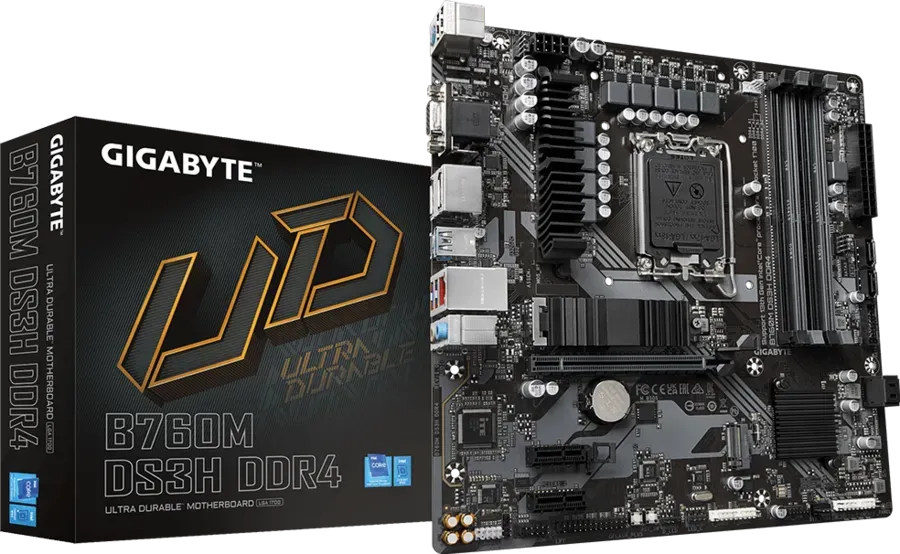
| Spec | Value |
|---|---|
| Chipset | B760 |
| Memory | 4x DDR4, up to 128 GB |
| PCIe Slots | 1x x16 (CPU, Gen 4) + 2x x1 (chipset, Gen 3) |
| M.2 | 2x (1x CPU Gen 4, 1x chipset Gen 4) |
| SATA | 4x 6Gb/s |
| LAN | 2.5GbE (Realtek) |
| Form Factor | mATX (244 × 244mm) |
The Gigabyte DS3H is the default budget mATX recommendation everywhere. It’s cheap, available, well-documented, and has decent specs for the price. 2.5GbE, 2x M.2, 4x SATA, 4x DDR4 slots — on paper it looks perfect.
Why I rejected it: The PCIe layout is a dealbreaker. One x16 slot and two x1 slots. That means:
- The GPU takes the x16 slot ✅
- The 10GbE NIC needs x4 minimum — but only x1 slots remain ❌
- An HBA card also needs x4 — same problem ❌
With the DS3H, you can have a GPU or a 10GbE card, but not both. And neither the 10GbE NIC nor an HBA will work properly in the x1 slots — they physically don’t fit, or they’d be bandwidth-starved if forced to run at x1.
For a pure gaming PC, the DS3H is fine — you only need one x16 slot. For a homelab that needs multiple expansion cards, it’s a non-starter. This was the critical insight that changed my entire approach to motherboard selection: check the PCIe electrical configuration first, everything else second.
MSI PRO B660M-A / B760M-A DDR4
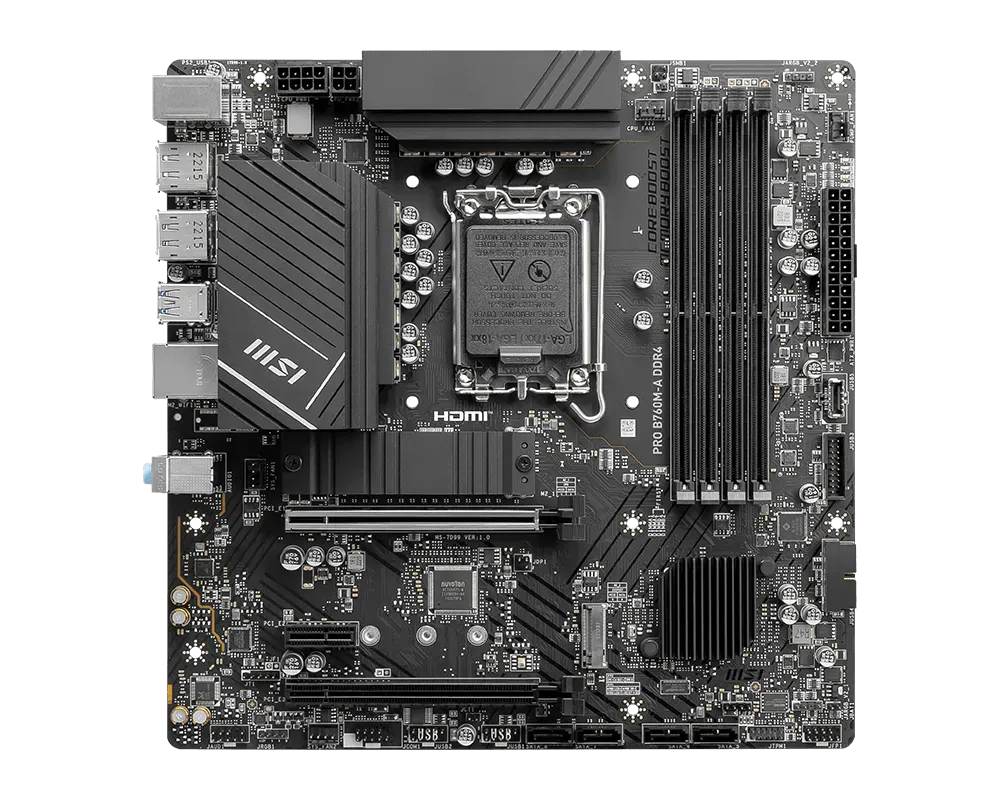
| Spec | Value |
|---|---|
| Chipset | B660 / B760 |
| Memory | 4x DDR4, up to 128 GB |
| PCIe Slots | 1x x16 (CPU, Gen 4) + 1x x4 (chipset, Gen 3) + 1x x1 (chipset, Gen 3) |
| M.2 | 2x (1x CPU Gen 4, 1x chipset Gen 4/SATA) |
| SATA | 4x 6Gb/s |
| LAN | 2.5GbE (Realtek) |
| Form Factor | mATX (244 × 244mm) |
Now we’re talking. The MSI PRO series has the PCIe layout I need: x16 + x4 + x1. That means:
- GPU in the x16 slot ✅
- 10GbE NIC or HBA in the x4 slot ✅
- Additional x1 card if needed ✅
The B660M-A and B760M-A are functionally very similar — the B760 adds a few minor chipset improvements but the core layout is identical. Both have 2.5GbE, 4x SATA, 2x M.2, and the crucial three-tier PCIe arrangement.
Why I didn’t buy it: Nothing wrong with it technically. The MSI PRO B760M-A DDR4 is a solid board and would have worked perfectly. I just found something better for less money.
ASUS Prime B760M-A DDR5
| Spec | Value |
|---|---|
| Chipset | B760 |
| Memory | 4x DDR5, up to 128 GB |
| PCIe Slots | 1x x16 (CPU, Gen 4) + 1x x4 (chipset, Gen 3) + 1x x1 (chipset, Gen 3) |
| M.2 | 2x (1x CPU Gen 4, 1x chipset Gen 4) |
| SATA | 4x 6Gb/s |
| LAN | 2.5GbE (Realtek) |
| Form Factor | mATX (244 × 244mm) |
Same PCIe layout as the MSI: x16 + x4 + x1. Same 2.5GbE, same 4x SATA, same 2x M.2. But with DDR5 instead of DDR4.
Important detail about the PCIe slots: All three PCIe slots on this board are physically x16-sized connectors, but they operate at different electrical widths. The first slot runs at full x16 from the CPU (PCIe 4.0). The second slot is physically x16 but wired for x4 from the B760 chipset (PCIe 3.0). The third slot is also physically x16 but wired for x1 from the chipset (PCIe 3.0). This is actually an advantage — any expansion card physically fits in any slot, regardless of its electrical requirements. A 10GbE NIC or HBA that needs x4 will slot right into the second x16-sized connector and run at its proper x4 bandwidth.
Why this won: I found it used for €65. That’s less than the DDR4 MSI boards were going for on the same marketplace. For €65 I get:
- The exact PCIe layout I need (x16 + x4 + x1)
- DDR5 support — future-proof memory standard with an upgrade path to faster kits as DDR5 matures and prices drop
- 4 DIMM slots — start at 32 GB, grow to 64 or 128 GB
- 2.5GbE, 2x M.2, 4x SATA — checks every connectivity box
- ASUS BIOS — subjective, but I find the ASUS UEFI more intuitive than Gigabyte’s or MSI’s for power management tuning
At €65, this board costs less than most DDR4 alternatives on the used market while offering a better memory standard. The “DDR4 is cheaper” narrative only holds true for the RAM sticks themselves — and even there, the gap is narrowing to €10-15 for 32 GB kits.
The PCIe Lesson
Here’s the comparison that made the decision clear:
| Feature | Gigabyte DS3H | MSI PRO B760M-A | ASUS Prime B760M-A |
|---|---|---|---|
| PCIe x16 (GPU) | ✅ 1 | ✅ 1 | ✅ 1 |
| PCIe x4 (10GbE/HBA) | ❌ | ✅ 1 | ✅ 1 |
| PCIe x1 | 2 | 1 | 1 |
| Memory | DDR4 | DDR4 | DDR5 |
| RAM Slots | 4 | 4 | 4 |
| M.2 Slots | 2 | 2 | 2 |
| SATA | 4 | 4 | 4 |
| 2.5GbE | ✅ | ✅ | ✅ |
| Used Price | ~€60-80 | ~€70-90 | €65 |
The Gigabyte DS3H fails the expansion test. It’s a fine board for a single-GPU system, but a homelab that needs GPU + 10GbE + potentially HBA cannot work with only x1 expansion slots.
The MSI and ASUS boards are functionally equivalent in PCIe layout. The ASUS won on price (€65 vs €70-90 for the MSI DDR4 variants) and memory standard (DDR5 vs DDR4).
If I’d bought the board based on price alone, I’d have grabbed the DS3H and discovered the expansion limitation months later when trying to add a 10GbE card. PCIe layout is the hidden constraint that most build guides don’t emphasize enough.
What’s Next
Motherboard secured. The next decisions are RAM and storage — how much DDR5 to start with, and what drives go into those 8 hot-swap bays. That’s coming up next.