Choosing the RAM: Why I Went Straight to 64 GB DDR5
The DDR4 vs DDR5 debate was already settled by the motherboard choice. The real question was capacity — and why starting with 64 GB of Corsair Vengeance DDR5 avoids the most common homelab mistake.
On this page
The motherboard is chosen — an ASUS Prime B760M-A DDR5. That decision already answered the DDR4 vs DDR5 question. What’s left is simpler but still easy to get wrong: how much RAM, what speed, and which kit?
DDR4 vs DDR5: Already Decided
If you read the motherboard article, you know the story. DDR4 boards cost more used than DDR5 equivalents because of supply and demand dynamics. I bought a DDR5 board for €65 — less than most DDR4 alternatives. So DDR5 it is.
But let me briefly address why DDR5 doesn’t matter much for server workloads — and why that’s okay.
DDR5-4800 (the base spec) offers higher bandwidth than DDR4-3200 — roughly 38.4 GB/s vs 25.6 GB/s per channel. For gaming, video editing, or scientific computing, this matters. For a homelab running Proxmox with Docker containers, Home Assistant, Pi-hole, and Plex? You’ll never notice. The workloads are I/O-bound (disk and network), not memory-bandwidth-bound.
The latency story is similar. DDR5’s absolute latency in nanoseconds is comparable to DDR4 at the base tier. CAS latency numbers are higher on DDR5 (CL40 vs CL16), but the actual access time in nanoseconds is roughly the same because the clock is faster.
So why go DDR5 at all? Not for performance today — for platform viability tomorrow. DDR4 is end-of-life. DDR5 prices are still dropping. If I need to upgrade RAM in two years, DDR5 kits will be cheap and plentiful. DDR4 will be a niche market with rising prices. The motherboard locked in this decision, and it was the right one.
The Real Question: How Much?
This is where most homelab builders get it wrong. The temptation is to start small:
“I’ll put in 16 GB now and upgrade later when I need it.”
I’ve fallen for this exact logic before. With the NiPoGi mini PC, I started with the built-in 8 GB, told myself it was “enough for Docker,” and hit the wall within months when I wanted to run more than a handful of containers. The upgrade path on that machine was… buying a different machine.
With a proper desktop build on an mATX board with 4 DIMM slots, the upgrade path exists. But “I’ll upgrade later” has hidden costs:
-
Matched pairs matter. DDR5 runs in dual-channel. Adding a mismatched stick later (different speed, timings, or even different manufacturing batch) can force both sticks to run at the slower spec, or cause stability issues. Buying a matched kit now avoids this entirely.
-
Prices may not drop as much as you hope. DDR5 prices have already fallen dramatically from launch. The floor might be close. Waiting 6-12 months to buy more RAM might save €10, or it might save nothing.
-
The pain of running out. In a Proxmox environment, RAM is the primary resource that determines how many VMs you can run simultaneously. CPU cores can be overcommitted (Proxmox handles this well). Storage is easy to add. But RAM is a hard limit — when it’s full, the OOM killer starts making decisions for you, and those decisions are always bad.
16 GB: Too Tight
A Proxmox host with 16 GB can run a few lightweight VMs:
- Proxmox itself needs ~1-2 GB
- An OPNsense firewall VM: 2-4 GB
- A Docker host VM: 4-6 GB
- That leaves 4-8 GB for… everything else
“Everything else” in my case means a NAS VM, potentially a Home Assistant VM, monitoring (Grafana + Prometheus), and room for experimenting. At 16 GB, you’re constantly micromanaging memory allocation and every new service is a negotiation.
32 GB: Comfortable Today
Doubling to 32 GB gives meaningful breathing room:
- Proxmox: 1-2 GB
- OPNsense: 4 GB
- Docker host: 8 GB
- NAS VM: 4-8 GB (ZFS loves RAM for ARC cache)
- Spare: 8-12 GB
This works. For a homelab that stays modest — a few VMs, some Docker containers, basic services — 32 GB is fine. Many homelabbers run perfectly happy on 32 GB for years.
But I know myself. “A few VMs” will become “a dozen VMs” within a year. AI inference, even CPU-only, likes dedicated RAM. ZFS ARC cache is a RAM vacuum — the more you give it, the faster your NAS feels. And there’s always one more service to try.
64 GB: Room to Grow
64 GB on a homelab is luxurious. It means:
- Proxmox: 2 GB
- OPNsense: 4 GB
- Docker host: 16 GB (run dozens of containers without thinking about it)
- NAS VM: 16 GB (ZFS ARC cache gets properly fed)
- AI/testing VM: 8-16 GB
- Spare: 8-16 GB for whatever comes next
At 64 GB, you stop thinking about RAM. Services get what they need without constant rebalancing. ZFS gets a proper ARC cache. Docker containers don’t get OOM-killed during spikes. You have headroom for experiments without shutting something else down first.
The board supports up to 128 GB (4x 32 GB), so starting with 2x 32 GB in dual-channel leaves two slots free for a future jump to 128 GB if the workload ever demands it.
Speed and Timings: Does It Matter?
For a server? Barely.
DDR5 speeds range from 4800 MT/s (the JEDEC base spec) to 8000+ MT/s for extreme overclocking kits. The i5-12400 officially supports DDR5-4800. You can run faster kits — the ASUS Prime B760M-A supports XMP profiles — but the real-world difference in a server context is negligible.
Here’s what actually matters:
- JEDEC-standard speeds are fine. DDR5-4800 or DDR5-5200 kits that run at their rated speed without XMP are the most stable and reliable option for a 24/7 server. No need to gamble on XMP stability for a machine that should never crash.
- CAS latency is irrelevant for this workload. The difference between CL36 and CL40 translates to ~1-2ns of access time difference. No VM or container will ever notice.
- ECC is nice but not essential. The i5-12400 and B760 chipset don’t officially support ECC (unbuffered ECC works on some boards with some BIOSes, but it’s not guaranteed). For a homelab that isn’t running critical production databases, non-ECC is perfectly acceptable.
The takeaway: buy whatever DDR5 kit offers the best price per gigabyte at a standard speed. Don’t overpay for high-speed gaming RAM with RGB.
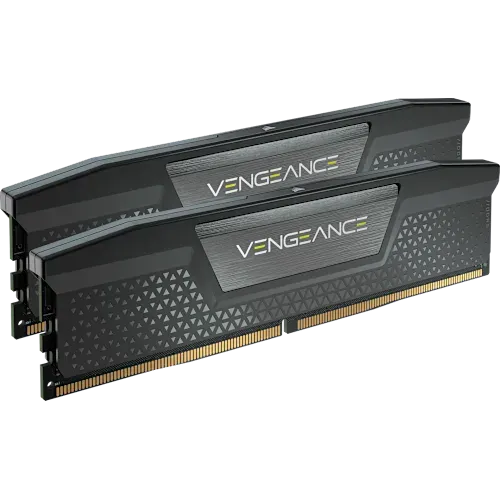
The Pick: Corsair Vengeance DDR5 64 GB (2x 32 GB)
| Spec | Value |
|---|---|
| Capacity | 64 GB (2x 32 GB) |
| Type | DDR5 |
| Speed | 5600 MT/s |
| CAS Latency | CL36 |
| Voltage | 1.25V |
| Form Factor | DIMM (desktop) |
| XMP | Supported (Intel XMP 3.0) |
| Price | €245 (Amazon) |
The Corsair Vengeance DDR5 kit at €245 on Amazon. Here’s why:
Capacity: 64 GB in a 2x 32 GB configuration. Dual-channel from day one, with 2 empty slots for future expansion to 128 GB.
Speed: 5600 MT/s with CL36 timings. This is above the JEDEC DDR5-4800 base spec, so it’ll run at 4800 by default or 5600 with XMP enabled. Either way is fine for a server. I’ll probably leave XMP off for maximum stability and enable it later if I feel like testing.
Brand reliability: Corsair Vengeance is one of the most widely tested DDR5 kits on the market. Motherboard QVL (Qualified Vendor List) compatibility is broad. The ASUS Prime B760M-A lists Corsair Vengeance in its QVL, which means it’s been tested and validated by ASUS for this specific board.
Price per GB: At €245 for 64 GB, that’s ~€3.83/GB. A 32 GB kit (2x 16 GB) of equivalent DDR5 runs about €70-90, which is ~€2.19-2.81/GB. So the price per GB is higher for the 32 GB sticks, but the total spend is obviously lower. The question is whether €245 for 64 GB is worth it versus €70-90 for 32 GB.
For me, yes. The €155-175 difference buys a machine that won’t hit RAM limits for years. Given the total build cost, RAM is not where I want to cut corners.
What I considered but rejected:
- Kingston Fury Beast DDR5: Similar specs, similar price, slightly less availability in my region at the time
- G.Skill Ripjaws S5: Excellent kit, but pricing was €10-15 higher for the 64 GB configuration with no meaningful advantage
- Generic / white-label DDR5: Tempting at €200-220, but no brand warranty support and unknown IC quality. For a 24/7 server, the €25-45 premium for a known brand with a lifetime warranty is worth it
The Math
Here’s how the memory decision stacks up in the full build context:
| Choice | Price | Capacity | Future Upgrade |
|---|---|---|---|
| 32 GB (2x 16 GB) DDR5 | ~€80 | Comfortable | Need to replace sticks at 64 GB+ (16 GB sticks limit max to 64 GB across 4 slots) |
| 64 GB (2x 32 GB) DDR5 | €245 | Generous | Add 2x 32 GB later for 128 GB |
| 64 GB (4x 16 GB) DDR5 | ~€160 | Generous | No upgrade path — all 4 slots filled |
| 128 GB (4x 32 GB) DDR5 | ~€480 | Overkill | None needed |
The 2x 32 GB configuration hits the sweet spot: enough capacity now, clean upgrade path later, reasonable price. The 4x 16 GB option is cheaper but fills all slots — a dead end.
What’s Next
RAM sorted. The remaining decisions are more about thermal and electrical engineering than computing: CPU cooling and power supply. In a compact SFF case, these choices are more constrained — and more interesting — than you’d expect.